Faithful Luma - luminance-based post-processing for Mirror's Edge
Adjustments to the Mirror's Edge shaders around tone mapping, auto exposure and bloom that aims to keep the intended look while fixing per channel clipping and hue shifts.
Mirror’s Edge built its identity on colour. A blinding white city cut through with splashes of hard, dominant colours, all of it pushed through a 2008 era post-processing chain that decides almost everything per channel: tone mapping, auto exposure and bloom each let red, green and blue negotiate the trip from HDR to your display on their own. That works fine until something gets bright. If you haven’t already noticed in this game, something is always bright.
Faithful Luma is a modification to that chain done through the game’s existing shader files. It aims to keep the original art direction intact and moves the brightness decisions onto luminance, where they better belong, so the hue shifts and channel clipping in bright areas disappear.
What the original per-channel processing does to the picture
One channel saturates before the others and the ratios between them drift, so an orange light slides toward yellow on its way to white. Bloom has a similar problem where the pass blooms any pixel where any single channel crosses the brightness threshold, so vivid surfaces get interpreted as bright and start glowing like lamps (Chapter 6 factory railings!).
The auto exposure also has its own quirks. The original model adapts incredibly slowly and sometimes just stops reaching its target which is why you might’ve noticed that loading maps in different orders and refocusing the game window will produce wildly different exposure levels. It also measures brightness with luminance weights from NTSC era. Faithful Luma replaces all three where every luminance value in the chain instead uses Rec.709 weights.
Summary of Faithful Luma’s changes
| Area | Original game | Faithful Luma |
|---|---|---|
| Tone mapping | Each channel tone mapped independently, so bright saturated colours clip and drift in hue | One Reinhard curve driven by luminance, with RGB rescaled around the result so hue is stable |
| Colour grading | Per channel midtone grade applied at every brightness | Original grade kept in full in shadows and lower midtones, fading to neutral in highlights |
| White correction | Warm surfaces that are blown out shift towards white | Bright low chroma whites are nudged neutral to mimic the original behaviour |
| Black floor | The final 8-bit image bottoms out above true black | A narrow rolloff maps the measured floor back to black and leaves the rest alone |
| Auto exposure | Square root key, slow adaptation speed tied to frame rate | Linear key, frame rate independent asymmetric adaptation, plus a dark scene boost |
| Bloom | Triggered by any single channel crossing threshold, so painted objects glow | Driven by luminance through a soft knee, so only real light sources bloom |
| Luminance weights | NTSC era values | Rec.709 throughout |
Tone mapping
The Faithful Luma tone mapper runs on one number per pixel. It takes the graded HDR colour, computes its luminance, and pushes that single value through an extended Reinhard curve whose shoulder is calibrated so the engine’s HDR ceiling lands exactly on display white. The RGB is then rescaled until its luminance matches the tone mapped result. Channel ratios never change, so hue holds steady from the midtones all the way up the shoulder.
Truly hot sources still bleach toward white. That part is deliberate and worth keeping, because a sun that stays stubbornly yellow looks wrong. The difference is that the desaturation now engages well above diffuse white and ramps in smoothly, instead of arriving as a side effect of three channels hitting their ceilings at three different times.
The original colour curves still run at the end of the chain, with one small correction - the output is normalised so the curves’ usable range reaches full display white instead of stopping a fraction short.
Colour grading
A lot of the game’s look is in its per channel midtone grade, and a naive luminance pipeline would flatten it into something generic. So for this reason Faithful Luma is a bit choosy about where it neutralises. Shadows and lower midtones keep the original grade at full strength, and because the Reinhard curve is nearly a straight line down there, dark areas come out almost identical to the original game. From the midtones upward the grade fades toward a neutral luminance matched version, and it is fully neutral before the highlights begin. Bright areas stop inheriting tints they were never meant to carry and dark areas keep their intended look.
White correction
One awkward thing about bringing down hot sources is that it reveals Mirror’s Edge’s whites are not always white. Sunlit concrete and the resulting overexposed surfaces can carry a slight yellow warmth (the sun colour in the editor is usually set to bleach white) that only really shows up once the highlight clipping is fixed. While there’s nothing technically wrong about this, it can look a little odd against the cool blue colour grading feel that some of the maps go for. To keep the expected look of neutral white highlights, Faithful Luma takes a creative decision here and looks for pixels that are both bright and close to neutral, then blends those pixels toward their own luminance.
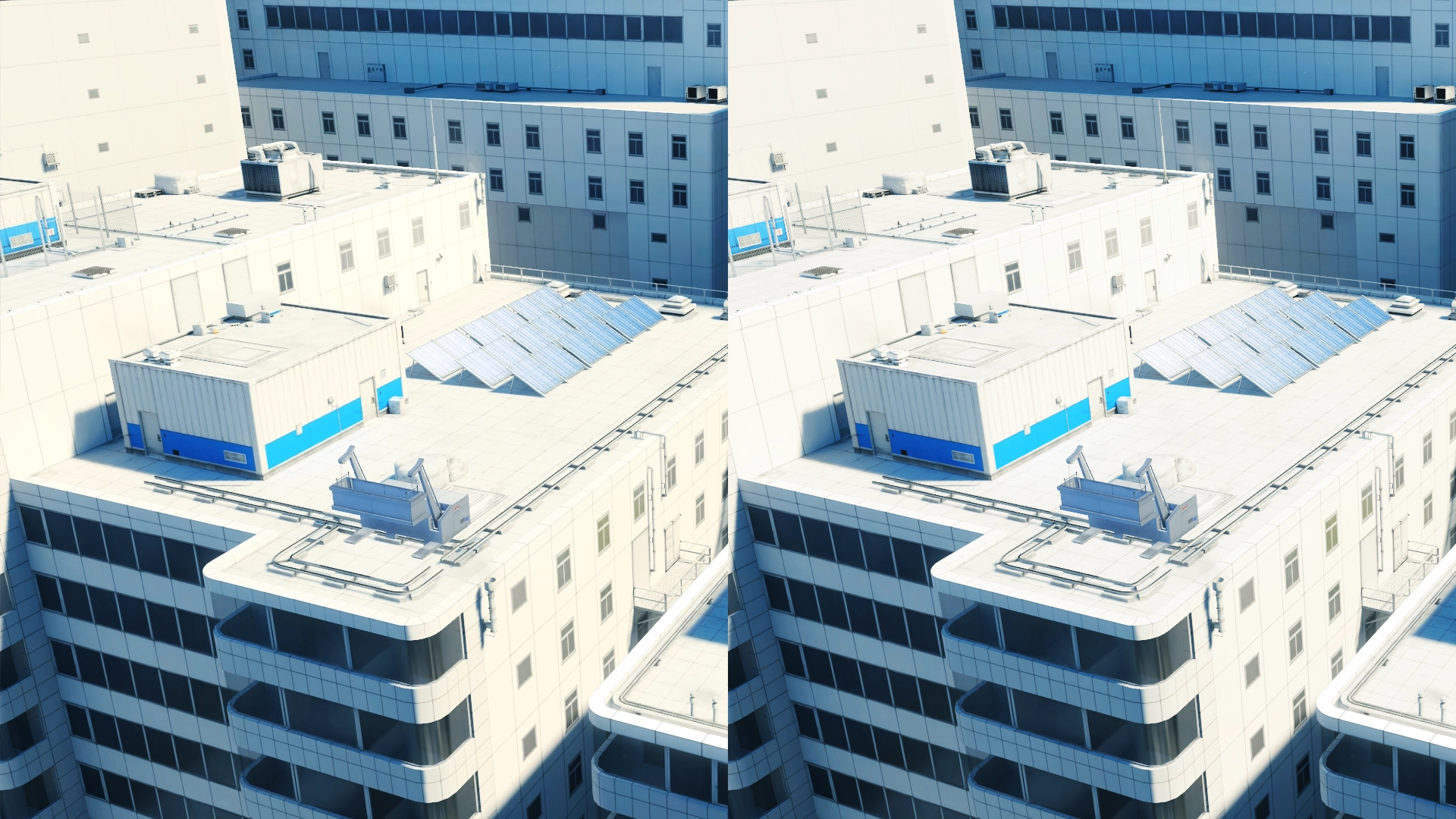 Faithful Luma before and after white correction
Black floor
The other display space fix lives at the bottom end. The rendering path can write pure black just fine, the problem is that the shader output never quite gets there. After the game’s gamma and colour curves, the darkest measured value sits a couple of encoded steps above zero, so the final 8-bit target records a lifted black instead of true black. This is kinda small on paper but it makes a difference in darker envrionments, especially on OLED displays.
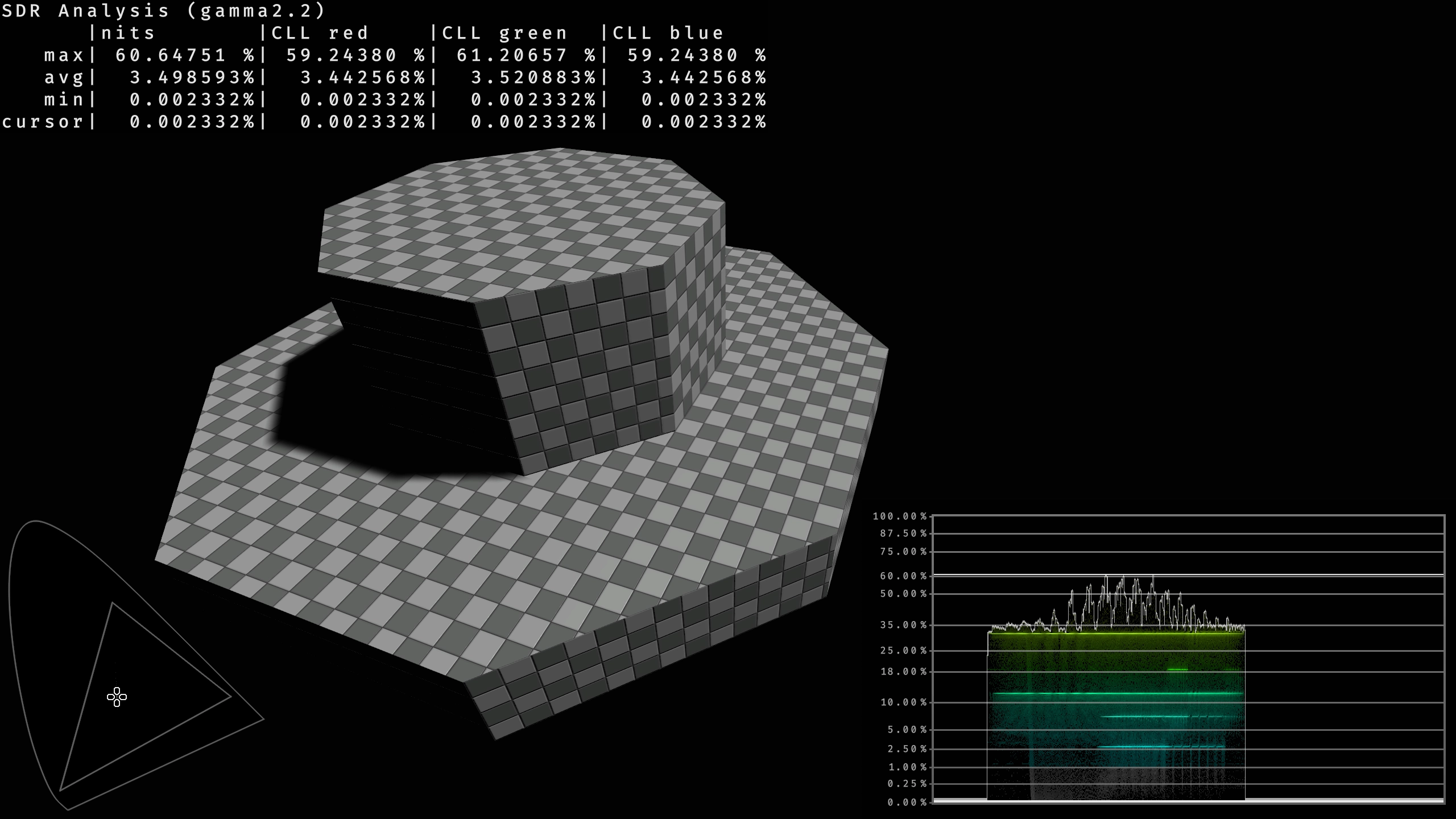 Original - note the “min” value
Faithful Luma corrects that floor just before the final 8-bit output and simply remaps the measured floor to true black, then rolls off quickly until the image is unchanged again by the lower midtones. Near-black colour relationships are preserved by scaling the pixel around its luminance rather than clipping each channel on its own.
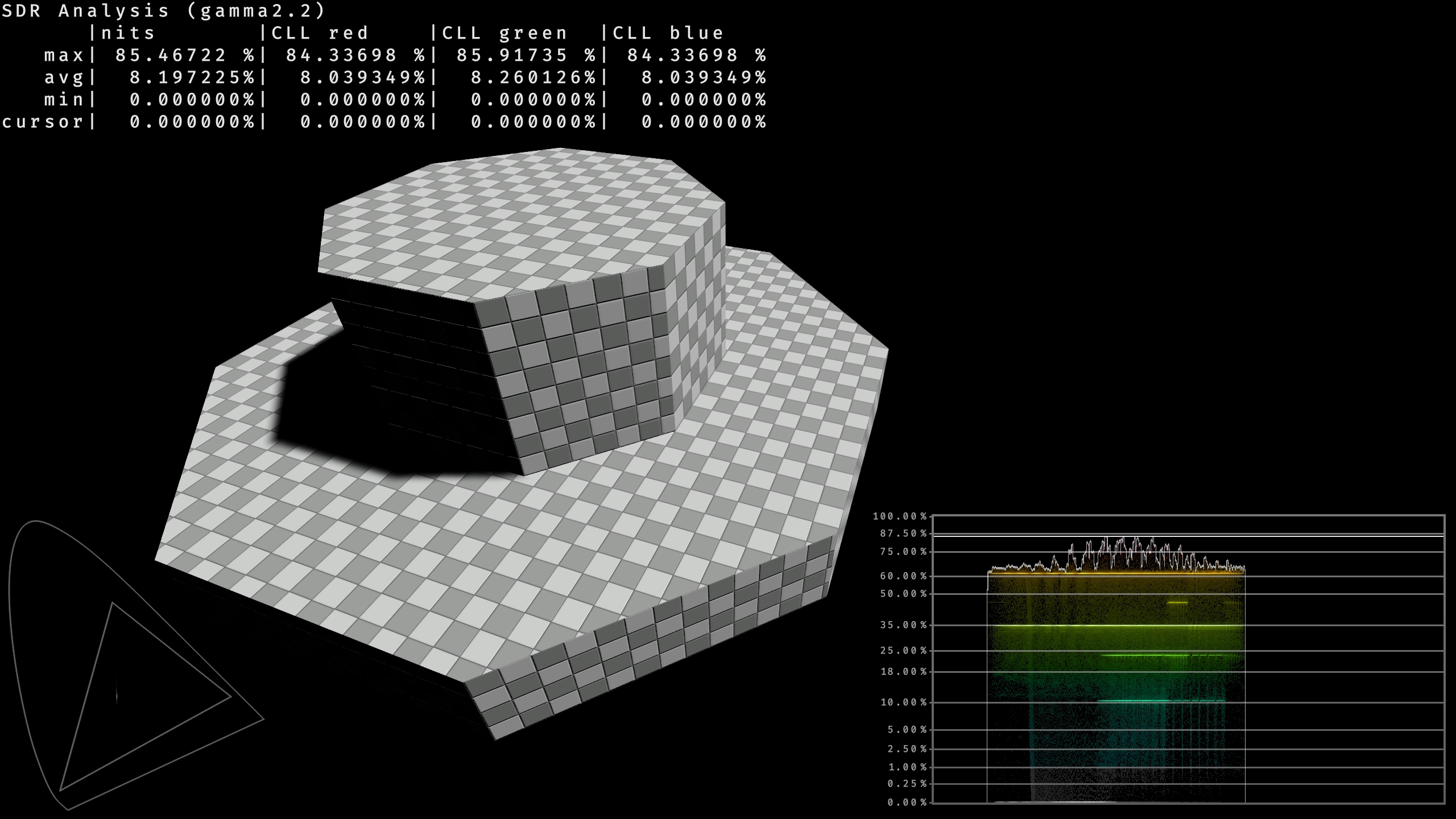 Faithful Luma - note the “min” value
Auto exposure
The new model is a plain linear key. Target exposure is inversely proportional to average scene luminance, so the frame settles at a fixed average brightness and the result is clamped to whatever exposure range the level designers chose.
The additional behaviour ontop of that is adaptation that is responsive and feels the same at any frame rate. The engine never hands the shader a frame time directly, but it does pass adaptation limits that were already scaled by frame time, so the shader divides that scaling back out and rebuilds adaptation as true per second rates. Levels that ask for faster or slower adaptation still get it, scaled proportionally.
 Original and Faithful Luma
Bloom
Two checks decide what actually gets to glow. Saturated colours that are not genuinely bright get held back by comparing the pixel’s luminance against its strongest channel. Hot sources get the opposite treatment - extra scatter weight that grows as they approach the HDR ceiling, up to double at the very top. Either way, the bloom keeps the source’s own colour rather than washing it toward white.
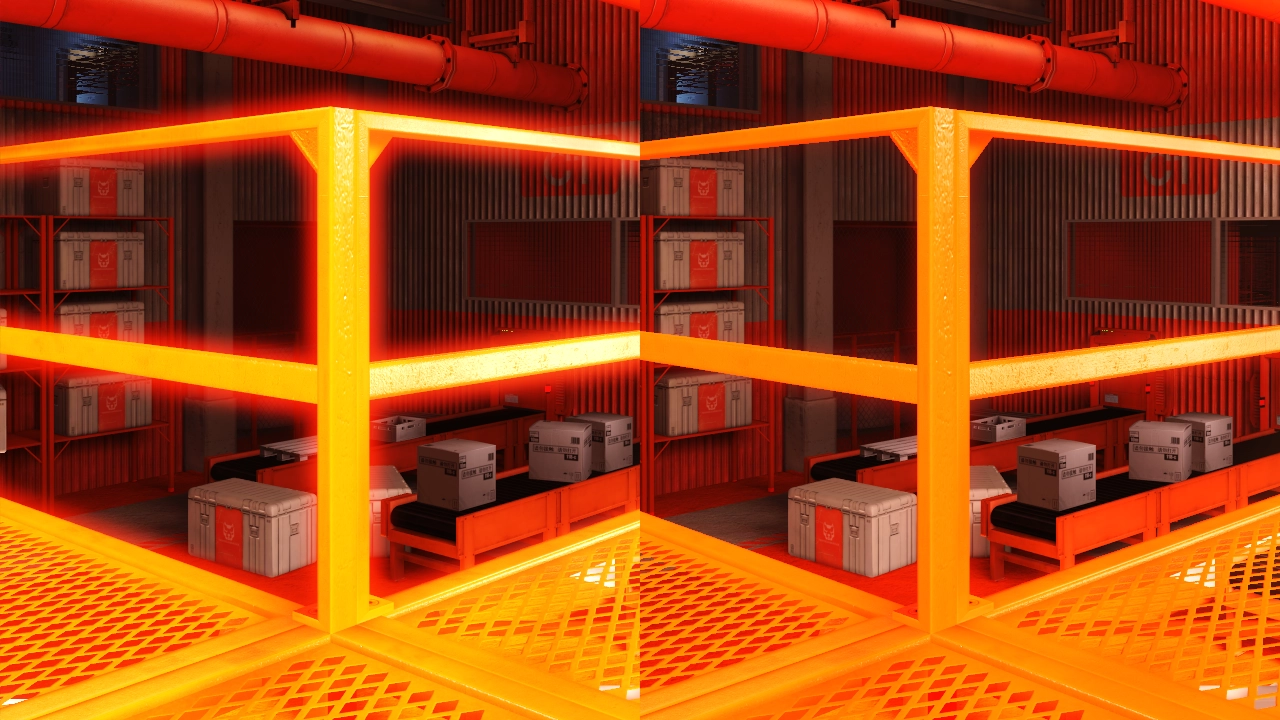 Original and Faithful Luma
Visual comparisons
Chapter 3A
Scroll to zoom · double-click to reset
Chapter 9G
Scroll to zoom · double-click to reset
Chapter 8B
Scroll to zoom · double-click to reset
Chapter 3B
Scroll to zoom · double-click to reset
Chapter 0B
Scroll to zoom · double-click to reset
Chapter 2C
Scroll to zoom · double-click to reset